
Conditional Logic Builder
A web system for IDF analysts to create and manage complex rules that generate soldier data and classifications. The redesign streamlined an outdated tool, improving clarity, speed, and day-to-day usability.
Role
UX Designer
Project Type
Product Redesign, Design System based
Platform
Web App
The Problem
The previous system was poorly designed, confusing, and hard to learn, especially for new team members. Its outdated interface made everyday use difficult and didn’t properly support their complex rule-building workflow.
Challanges
Redesigning a highly technical internal system came with a unique set of challenges. Beyond improving the product itself, this project marked my first-ever UX experience, pushing me to quickly learn how to translate complex logic into clear, intuitive design. The goal was to create a tool powerful enough for expert users, yet simple enough for new team members to learn with confidence.
Making Complexity Feel Simple
The original tool felt crowded and confusing which made it harder for users to understand what they were doing. The challenge was to redesign it so everything felt clear, structured and easy to work with every day.
Clarifying Nested Rules and Structure
Users often worked with rules inside other rules but the old design did not make that hierarchy obvious. The challenge was to create a layout that clearly showed where things belonged and helped users follow the logic without getting lost.
Learning UX in a Complex Space
This was my first ever UX project. I had to learn the UX process while also understanding a very complex system. It pushed me to quickly connect technical thinking with intuitive design.
Research
Since this system was built for a very small, specialized team, the research focused on understanding their workflow and the logic behind the existing tool. I met with the team to learn how they created rules, where they struggled, and what the system wasn’t supporting today. Much of the process was simply mapping how the logic tables worked and identifying gaps in clarity, structure, and usability.
Understanding Their Workflow Patterns
We learned that building a rule table could take several days, not hours. This insight shaped the need for features like a clearer home view, quick access to ongoing work, and better organization of recent tables.
Uncovering Missing Use Cases
By reviewing the old system together, we found unclear nesting, hidden capabilities, and no easy way to reuse logic made by others. These gaps helped define the core improvements in the redesign.
Learning a Complex System as a UX Beginner
As my first UX project, part of the research was also my own learning curve - grasping a deeply technical system and translating complex rules into simple, intuitive interactions.
Final Design

Main Page - My Builds
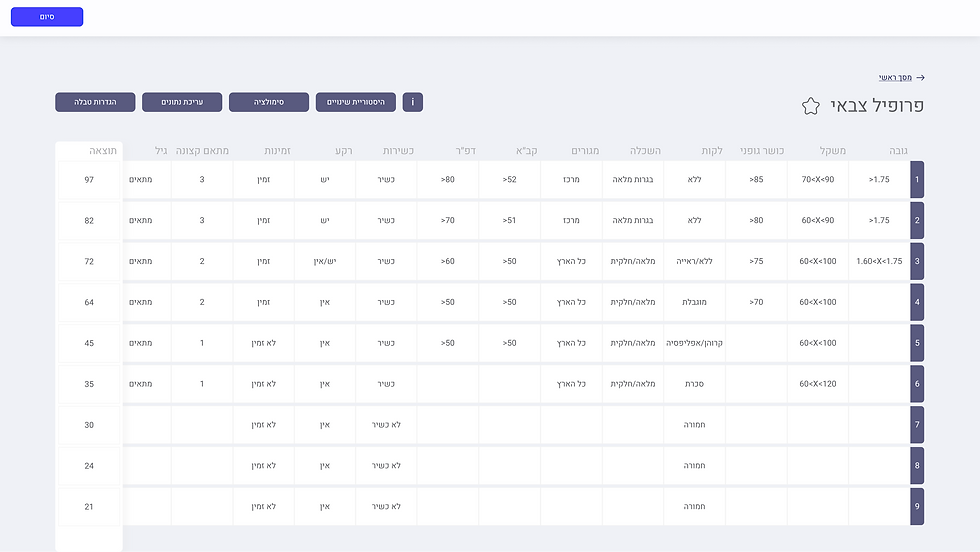
Conditional Table

Edit Conditional Table
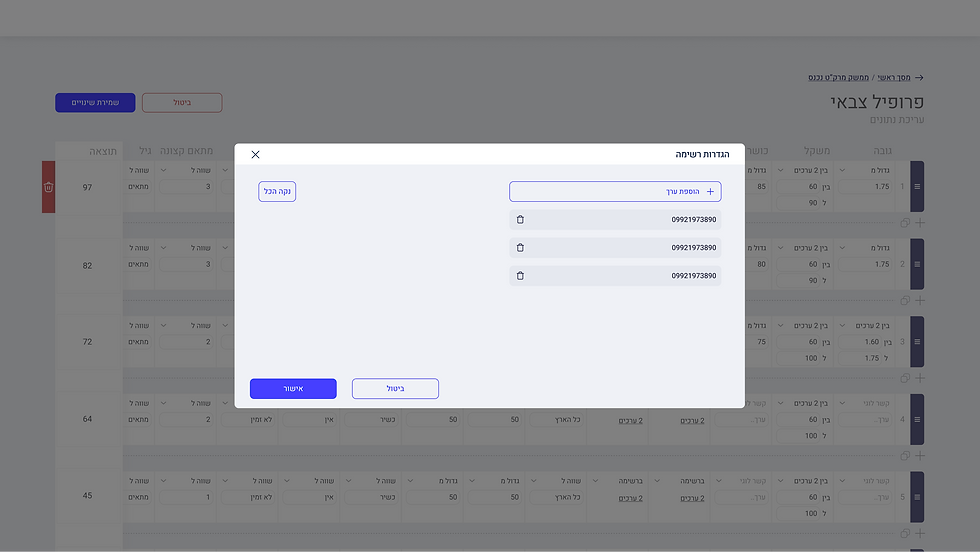
Editing Value List
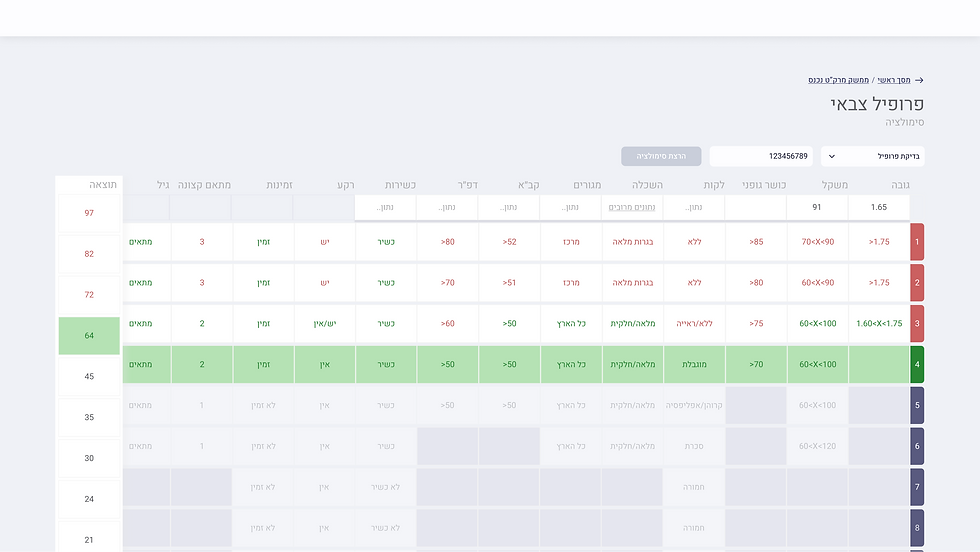
Running Simulation Result

Simulation Result Overall
Takeaways
This project showed me what it means to design beyond screens. To understand processes, logic structures, and real daily workflows. It shaped the foundations of my UX practice and proved that thoughtful design can transform even the most complex internal tool.